
Enabling and Managing the Theory Suite
Follow these steps to enable the Theory Suite for your pupils and manage their access permissions.
Step 1: Enable the Theory Suite
Log in to the Web Admin at https://web.totaldrive.app/login
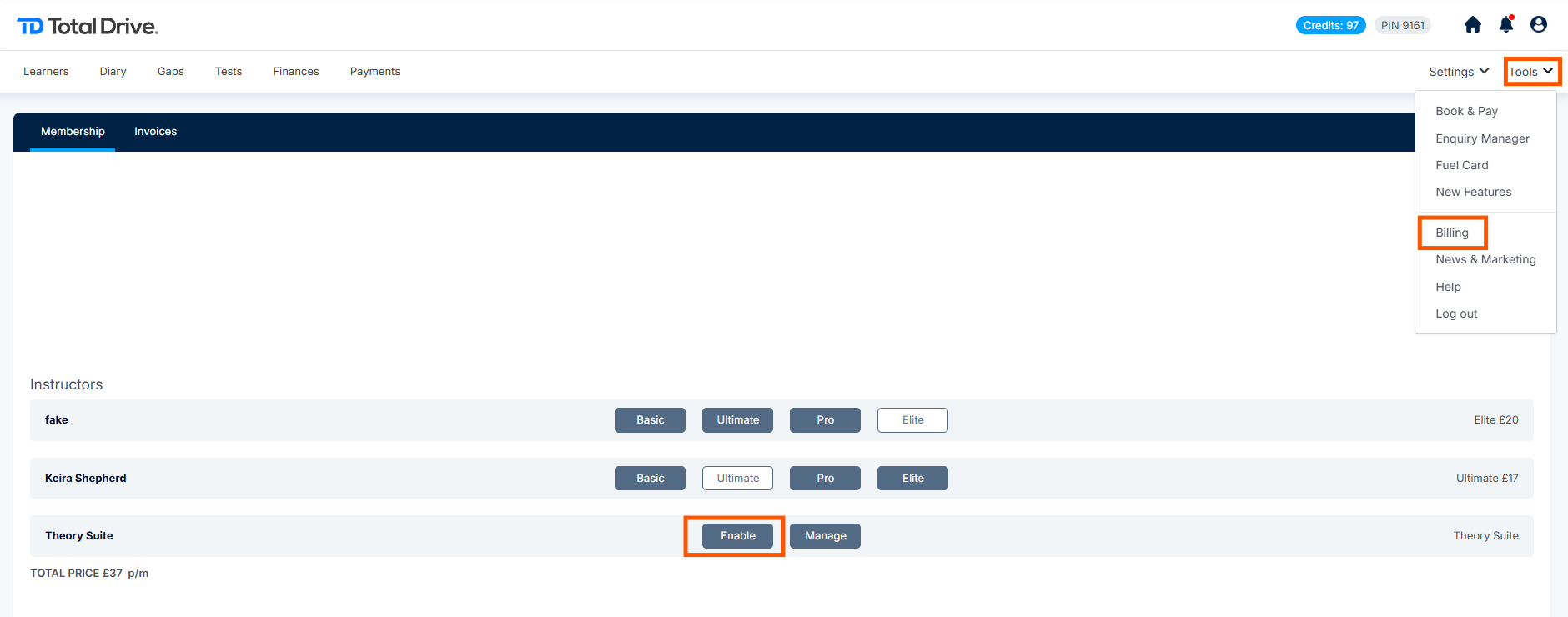
Navigate to Tools > Billing from the main menu
Locate the Theory Suite section
Click "Enable" to open the payment tab
Complete the payment process to activate the Theory Suite
Note: Once enabled, the Theory Suite becomes available for you to assign to pupils.
Step 2: Access Theory Suite Management
You can manage pupil access to the Theory Suite in two ways:
| Option | Action |
|---|---|
| Option 1 | Click "Manage" in the Theory Suite section of the Billing page |
| Option 2 | Navigate to Settings > Theory Suite from the main menu |
Both options will take you to the Theory Suite management screen.

Step 3: Manage Pupil Access
Once on the Theory Suite management screen, you can easily control which pupils have access:
Understanding the Toggle Buttons
| Toggle Color | Meaning |
|---|---|
| Blue | Pupil HAS Theory Suite access |
| Grey | Pupil does NOT have Theory Suite access |
How to Grant or Revoke Access
To grant access: Simply slide the toggle button to blue
To revoke access: Simply slide the toggle button to grey
Tip: Changes take effect immediately, allowing pupils to access the Theory Suite through their app once enabled.

Quick Reference Summary
| Step | Action | Location |
|---|---|---|
| 1 | Enable Theory Suite | Tools > Billing > Click "Enable" |
| 2 | Access management | Click "Manage" OR Settings > Theory Suite |
| 3 | Grant/revoke access | Slide toggle buttons (Blue = Access, Grey = No access) |
Frequently Asked Questions
Q: Can I enable the Theory Suite for individual pupils?
A: Yes, use the management screen to toggle access on/off for each pupil.
Q: How do pupils access the Theory Suite once enabled?
A: Pupils with access will see the Theory Suite option in their Total Drive app.
Q: What if I need to disable the Theory Suite for a pupil?
A: Simply return to the management screen and slide their toggle to grey.