
Follow these two simple steps to set up a PDI with their free trial:
Step 1: Create the Instructor Profile
Log in to your Total Drive Web Admin portal https://web.totaldrive.app/login
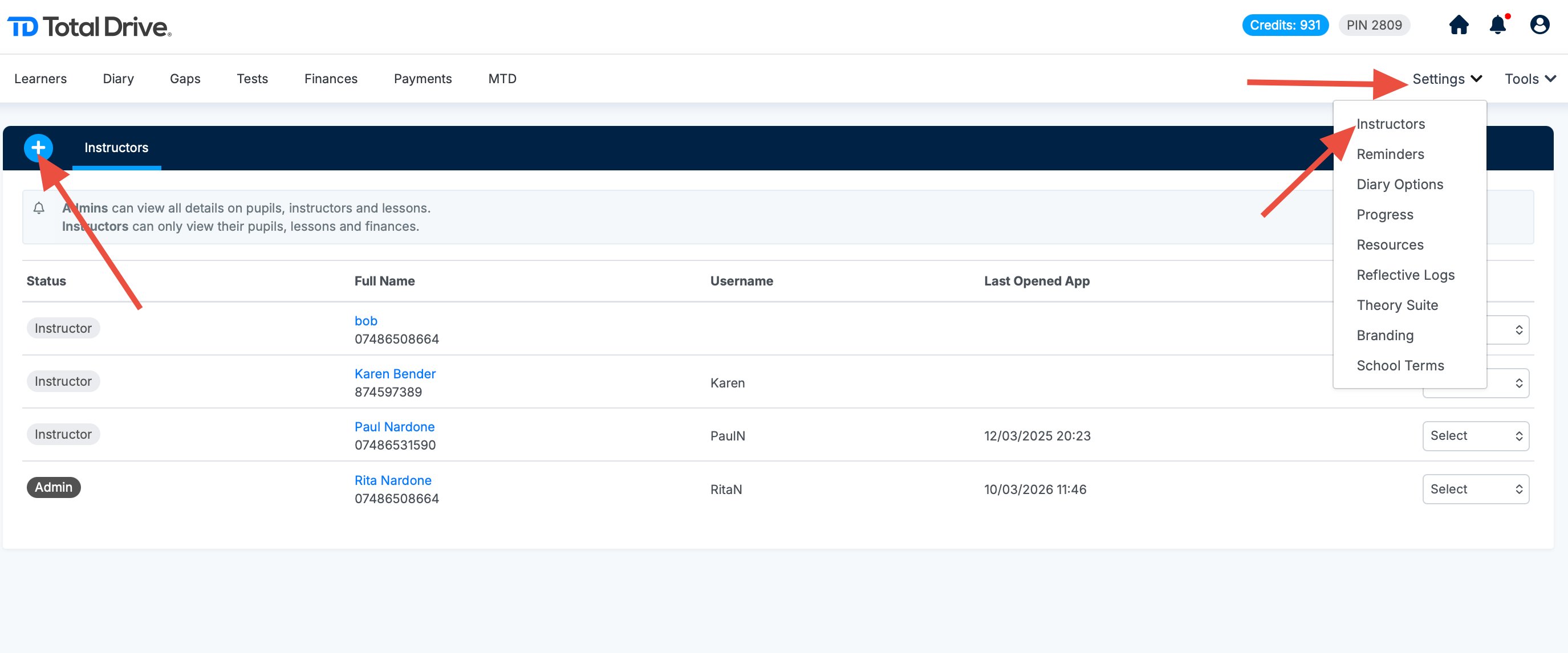
Navigate to Settings > Instructors
Click "+" and then click "add instructor" and complete the PDI's details
Use the PDI's personal information, not yours
Step 2: Notify Total Drive Support
Once the profile is created, email us at support@totaldrive.co.uk with the following:
A copy of their pink badge, OR
Proof of their Part 2 pass
✅ We'll activate their free trial as soon as we receive these documents.
Important Notes
Trial Duration: The free access lasts for up to 12 months, but ends immediately if the PDI passes their Part 3 test.
Update Us: If a PDI passes their Part 3 before the 12 months are up, please let us know so we can update their account status.
Verification Required: The trial cannot be activated without proof of pink badge or Part 2 pass.